Workshop
Using audio
Music
Voice over/ narration
Sound effects
Itunes mp3, audio files, CD's,
Commercially would have copywright issues
Websites download royalty free audio
recording sounds yourself
"sound library" shared folder
File formats
AIFF- mac
WAV- PC
mp3- itunes
m4a- format won't work on AE
Itunes preferences convert to different formats
SWITCH
converts audio files from one format to another
AE
File import file
audio same as image files
DB measurement of sound volume -48 is off
set keyframes to fade sounds in and out etc
editing audio to select the part of audio you want
move the bar to trim audio file like image
only hear sound in ram preview
Double click on audio to hear in own window
Can choose which seconds you want
Rendering
AE will not export audio automatically
output modile
format options same as image
tick audio output
Import circle 'Bounce' file from illustrator
same size as AE file
click on layer hold alt and drag to comp window
Grouping in AE
Parent- child relationship
Nesting composition
(pre-composing)
Select layer as parent
Select other layers click on parent
drop down menu select parent layer
they will become children of the parent layer
select them all at once and click on the drop down menu and all will become children
opacity will not change on all just one
Rotation and scale will change on all
Children can still do their own thing but also move with parent
nest it to duplicate
layer pre-compose, will create new composition
Showing posts with label After Effects workshop. Show all posts
Showing posts with label After Effects workshop. Show all posts
Wednesday, 19 January 2011

Wednesday, 12 January 2011
After Effects
Workshop
Pendulum task


Untitled from Brady Miller on Vimeo.
Pendulum task


Create solid- Select double click on circle to create a mask
Pan behind next to ellipse
drag another point
Rotation, top left, key frame, move to other side, add keyframe.
Untitled from Brady Miller on Vimeo.
After Effects
Workshop


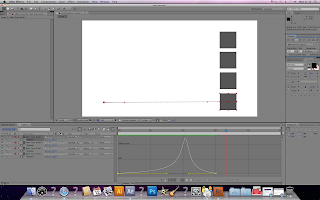
Press 'U' Twice to show which properties have been changed
Layer switches- Turn on or off certain features
Buttons along the top of the layer window
1st from left
Shy- Hides layers on timeline
Only show layers your using
Simplifies comp
Click button to hide all layers with shy clicked on
2nd from left
Continuously rasterize
will always be on with type mostly for illustrator
3rd
Quality- Change quality of layers / high quality \ low quality
4th fx
enable/disable any effects
5th
Frame blending- film strips- just for video
6th
Motion blur
on something moving
7th
Adjustment layer apply
Apply adjustment to more than one layer
8th 3D layer
Bottom left hide and show additional options
Mode- Like photoshop blend mode
Edit- split layer function


Changing speed- keyframe assistant easy ease easy ease in easy ease out
Start- leaving a key frame easy easy out
End keyframe easy easy in
dots get closer
Easy ease does both ease in and out


Graph editor
250 px sec constant speed
Ease out first key frame
o along timeline speed increases
Choose graph type
edit speed graph
Can change speed on graph click and drag keyframe
dot next to it 'Handle'
Can make more gradual speed much higher

Wednesday, 15 December 2010


After Effects

Change to all and the character works around an anchor point in the center


Each character now scaling around the same anchor point


Subscribe to:
Posts (Atom)